शुरू करने के लिए एक हाइट मैप छोड़ें
नॉर्मल मैप जेनरेटर क्या है?
एक मुफ़्त ऑनलाइन नॉर्मल मैप जेनरेटर जो पूरी तरह आपके ब्राउज़र में चलता है। एक हाइट मैप छोड़ें और यह छह PBR मैप — नॉर्मल, डिस्प्लेसमेंट, एम्बिएंट ऑक्लूज़न, स्पेक्युलर, रफ़नेस और कर्वेचर — आपके GPU पर रीयल-टाइम में बनाता है, लाइव 3D प्रीव्यू के साथ। आपकी छवियाँ आपके डिवाइस पर स्थानीय रूप से प्रोसेस होती हैं और कभी सर्वर पर नहीं भेजी जातीं।
ऑनलाइन नॉर्मल मैप कैसे बनाएँ
चार चरणों में हाइट मैप से पूर्ण PBR सेट तक — कोई खाता नहीं, कोई इंस्टॉल नहीं, कोई अपलोड नहीं।
एक हाइट मैप अपलोड करें
एक ग्रेस्केल हाइट मैप या कोई भी टेक्सचर खींचें, या ब्राउज़ करने के लिए क्लिक करें (PNG, JPG, WEBP)। पारदर्शी PNG समर्थित हैं।
मैप ट्यून करें
हर मैप का अपना लाइव स्लाइडर है — तीव्रता, ब्लर/शार्पन, AO, स्पेक्युलर, डिस्प्लेसमेंट, रफ़नेस और कर्वेचर।
3D में प्रीव्यू
किसी प्लेन, गोले, घन या सिलेंडर पर मटेरियल को तुरंत अपडेट होते देखें, या किसी भी मैप को पैन और ज़ूम से जाँचें।
डाउनलोड
एक मैप या पूरा सेट ZIP के रूप में सहेजें — PNG, JPG या WEBP, पारदर्शिता के साथ।
हाइट मैप से नॉर्मल मैप तक
इसी टूल में रेंडर किया गया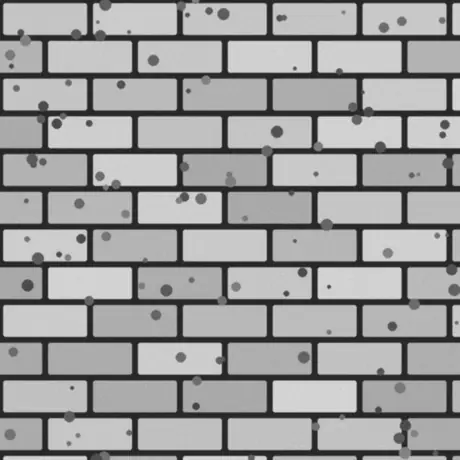
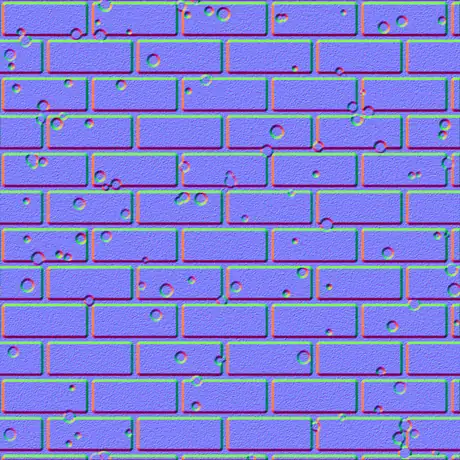
ग्रेस्केल हाइट मैप अंदर, टैंजेंट-स्पेस नॉर्मल मैप बाहर। हल्के पिक्सेल ऊँचे और गहरे नीचे माने जाते हैं; जनरेटर उस ढलान को लाल और हरे चैनलों में बदल देता है जिन्हें शेडर पढ़ता है। सब कुछ आपके GPU पर चलता है और छवि कभी ब्राउज़र से बाहर नहीं जाती।
यह नॉर्मल मैप जेनरेटर क्यों चुनें
अधिकांश ऑनलाइन जेनरेटर आपका टेक्सचर सर्वर पर अपलोड करके धीरे प्रोसेस करते हैं। यह आपके GPU पर, ब्राउज़र में चलता है और सब कुछ बनाए रखता है।
कुछ भी अपलोड नहीं होता
छवि सीधे डिस्क से पढ़ी जाती है और WebGL के साथ स्थानीय रूप से प्रोसेस होती है। कुछ भी प्रेषित नहीं होता, इसलिए नेटवर्क बंद होने पर भी काम करता है।
आपके GPU पर रीयल-टाइम
हर मैप फ़्रैगमेंट शेडर से बनता है, इसलिए स्लाइडर हिलाने पर सभी छह मैप कुछ मिलीसेकंड में अपडेट होते हैं — 4K पर भी।
छह मैप, हर एक समायोज्य
नॉर्मल, डिस्प्लेसमेंट, एम्बिएंट ऑक्लूज़न, स्पेक्युलर, रफ़नेस और कर्वेचर — हर एक का अपना लाइव कंट्रोल।
पारदर्शिता कट-आउट रहती है
अल्फ़ा चैनल वाला PNG छोड़ें और हर मैप साफ़ कट-आउट के रूप में सिल्हूट उभरे हुए के साथ आता है — डिकल और स्प्राइट के लिए आदर्श।
इंजन-रेडी आउटपुट
OpenGL (+Y) या DirectX (-Y) नॉर्मल, Sobel या Scharr डिटेल, ब्लर और शार्पन, साथ ही glTF, Unity और Unreal के लिए मेटल-रफ़ रफ़नेस मैप।
मुफ़्त, बिना साइनअप
कोई खाता नहीं, कोई वॉटरमार्क नहीं और फ़ाइल-आकार की कोई सीमा नहीं, सिवाय इसके कि आपका डिवाइस मेमोरी में कितना रख सकता है।
यह जो छह मैप बनाता है
एक ही height map से पूरा फ़िज़िकली-बेस्ड मटीरियल बनता है — एक normal map, एक displacement map, एक ambient occlusion map और तीन और। नीचे बताया गया है कि हर एक क्या है और कहाँ काम आता है।
| मैप | यह क्या है | किसके लिए सर्वोत्तम |
|---|---|---|
| नॉर्मल | टैंजेंट-स्पेस RGB दिशाएँ, OpenGL (+Y) या DirectX (-Y)। | रीयल-टाइम लाइटिंग में सतह के विवरण का आभास देना। |
| डिस्प्लेसमेंट | कंट्रास्ट-समायोज्य ऊँचाई डेटा। | वास्तविक ज्यामिति डिस्प्लेसमेंट, टेसेलेशन या पैरलैक्स। |
| एम्बिएंट ऑक्लूज़न | दरारों में कोमल संपर्क छायाएँ। | गुहाओं में विश्वसनीय, स्थिर शेडिंग। |
| स्पेक्युलर | सतह जहाँ प्रकाश पकड़ती है, ऊँचाई से व्युत्पन्न। | पुराने स्पेक्युलर / ग्लॉस शेडिंग वर्कफ़्लो। |
| रफ़नेस | स्थानीय सतह विवरण से माइक्रो-रफ़नेस। | glTF, Unity, Unreal में मेटैलिक-रफ़नेस वर्कफ़्लो। |
| कर्वेचर | उत्तल/अवतल कैविटी मैप — चमकीले किनारे, गहरी दरारें। | एज-वियर, गंदगी और मास्क जनरेशन। |
एक ही छवि से बने मैप
इसी टूल में रेंडर किया गया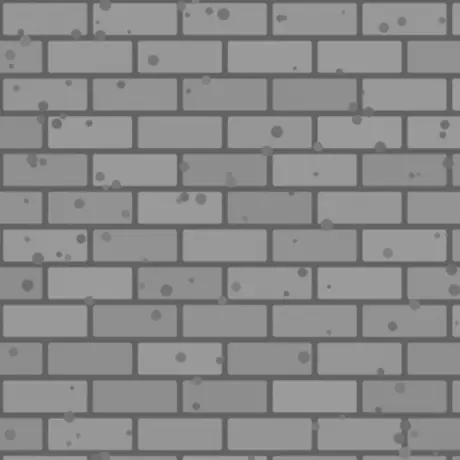
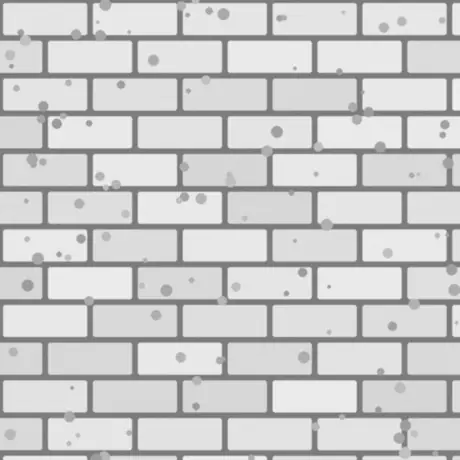
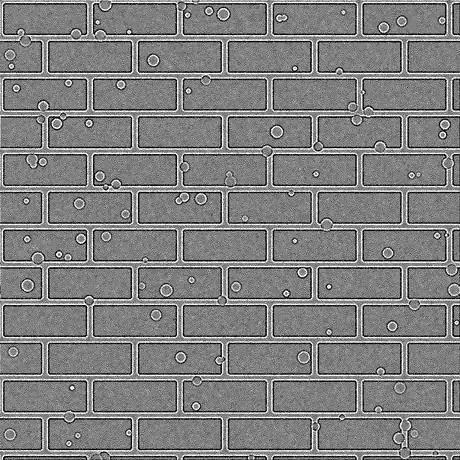
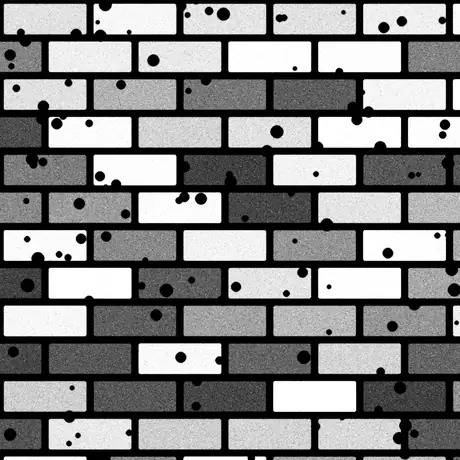
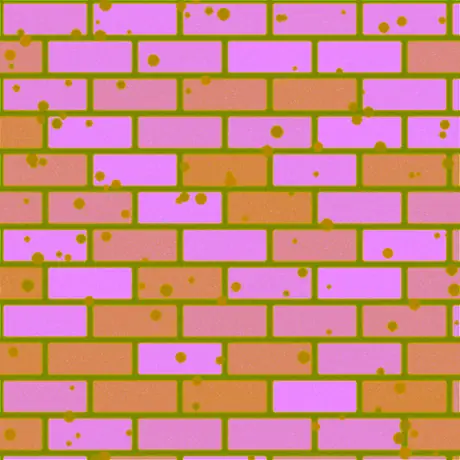
उसी एक हाइट मैप से बने आठ में से छह मैप। रफ़नेस और स्पेक्युलर मैप भी बनते हैं — डिफ़ॉल्ट तीव्रता पर स्पेक्युलर मैप ऊँचाई के मान बिना बदले आगे भेज देता है। ORM एम्बिएंट ऑक्लूज़न, रफ़नेस और मेटैलिक को एक ही छवि के लाल, हरे और नीले चैनलों में पैक करता है — यही व्यवस्था glTF अपेक्षित करता है।
सामान्य उपयोग
ईंट, पत्थर और टाइलें
किसी फ़ोटो या पेंट किए हाइट मैप को नॉर्मल और AO मैप में बदलें ताकि सपाट दीवारें और फ़र्श असली चिनाई की तरह प्रकाश पकड़ें — बिना अतिरिक्त ज्यामिति के।
PNG से लोगो और डिकल
एक पारदर्शी PNG छोड़ें और नॉर्मल, रफ़नेस और कर्वेचर साफ़ कट-आउट के रूप में आकार उभरे हुए के साथ आते हैं, दूसरे मटेरियल पर लेयर करने के लिए तैयार।
glTF के लिए एक मेटल-रफ़ सेट
Unity, Unreal, Godot, Blender और glTF मानक द्वारा उपयोग किए जाने वाले मेटैलिक-रफ़नेस वर्कफ़्लो के लिए नॉर्मल, रफ़नेस और AO एक साथ एक्सपोर्ट करें।
एज-वियर और गंदगी मास्क
किनारों पर खरोंच और दरारों में मैल लाने के लिए अपने शेडर या टेक्सचरिंग टूल में कर्वेचर और AO मैप को मास्क के रूप में उपयोग करें।
अक्सर पूछे जाने वाले प्रश्न
ब्राउज़र में नॉर्मल मैप बनाने के बारे में सबसे अधिक पूछे जाने वाले प्रश्न।
क्या मेरी छवियाँ कहीं अपलोड होती हैं?
नहीं। जेनरेटर आपकी छवि सीधे ब्राउज़र में पढ़ता है और आपके GPU पर WebGL से स्थानीय रूप से प्रोसेस करता है। कुछ भी सर्वर पर नहीं भेजा जाता, इसीलिए पेज लोड होने के बाद यह ऑफ़लाइन भी काम करता है।
मैं कौन-कौन से मैप बना सकता हूँ?
छह: नॉर्मल, डिस्प्लेसमेंट, एम्बिएंट ऑक्लूज़न, स्पेक्युलर, रफ़नेस और कर्वेचर। हर एक का अपना स्लाइडर है, और आप किसी एक मैप या पूरे सेट को एक साथ ZIP के रूप में PNG, JPG या WEBP में डाउनलोड कर सकते हैं।
क्या यह तेज़ है? क्या यह मेरे GPU का उपयोग करता है?
हाँ। सभी मैप आपके ग्राफ़िक्स कार्ड पर WebGL फ़्रैगमेंट शेडर से बनते हैं, इसलिए स्लाइडर हिलाने पर हर मैप कुछ मिलीसेकंड में अपडेट होता है — 4K पर भी — बिना लैग और बिना सर्वर तक जाए।
क्या यह पारदर्शी (PNG) छवियों के साथ काम करता है?
हाँ। पारदर्शिता बनी रहती है: हर बना हुआ मैप आपकी छवि के अल्फ़ा से मेल खाता साफ़ कट-आउट बनता है, जिसमें आकार की सिल्हूट उभरी होती है। PNG और WEBP पारदर्शिता रखते हैं; JPG को सफ़ेद पर समतल कर दिया जाता है।
OpenGL और DirectX नॉर्मल मैप में क्या अंतर है?
ये हरे (Y) चैनल की दिशा में भिन्न होते हैं। OpenGL (+Y) Unity, Blender और glTF उपयोग करते हैं; DirectX (-Y) Unreal Engine और कई गेम उपयोग करते हैं। अपनी ज़रूरत का इंजन प्रीसेट चुनें, या इसे Invert Y से पलटें।
क्या मैं इन्हें Unity, Unreal या Blender में उपयोग कर सकता हूँ?
हाँ। नॉर्मल मैप OpenGL और DirectX दोनों परिपाटियों में आता है, और रफ़नेस मैप Unity, Unreal, Godot, Blender और glTF द्वारा उपयोग किए जाने वाले मेटैलिक-रफ़नेस वर्कफ़्लो के लिए उपयुक्त है। बिना हानि गुणवत्ता के लिए PNG के रूप में एक्सपोर्ट करें।
मुझे किस छवि से शुरू करना चाहिए?
ग्रेस्केल हाइट मैप (बंप मैप) सबसे अच्छा परिणाम देता है: हल्के क्षेत्रों को ऊँचा और गहरे को नीचा माना जाता है। आप एक डिफ्यूज़ टेक्सचर भी दे सकते हैं और टूल ल्यूमिनेंस से ऊँचाई का अनुमान लगाएगा, फिर ब्लर/शार्पन और डिटेल फ़िल्टर से समायोजित करें।
संबंधित टूल
3D व्यूअर
स्टूडियो लाइटिंग, एनिमेशन प्लेबैक और उच्च-रिज़ॉल्यूशन रेंडर के साथ STL, OBJ, GLB और अधिक खोलें व जाँचें।
3D फ़ाइल कन्वर्टर
ब्राउज़र में STL, OBJ, GLTF, GLB, PLY, FBX और USDZ के बीच कन्वर्ट करें, रिग और एनिमेशन सुरक्षित रखते हुए।