मुफ़्त फ़ॉन्ट से Typeface.json कन्वर्टर
बदलें TTF and OTF फ़ॉन्ट को Three.js typeface.json में तुरंत अपने ब्राउज़र में — 100% मुफ़्त, निजी और बिना सर्वर अपलोड।
यहाँ क्लिक करें या फ़ॉन्ट फ़ाइल छोड़ें
TTF और OTF समर्थित (अधिकतम 50MB)
रूपांतरण सेटिंग्स
केवल विशिष्ट वर्णों को परिवर्तित करके आउटपुट फ़ाइल का आकार सीमित करता है।
यदि आपका 3D टेक्स्ट उल्टा दिखे तो इसका उपयोग करें।
font.ttf
कनवर्ट करने के लिए तैयार
3D पूर्वावलोकन
WebGLपूर्वावलोकन देखने के लिए फ़ॉन्ट अपलोड करें
typeface.json क्या है?
It's a JSON-based font format used by Three.js `FontLoader`. Converting your TTF files allows them to be loaded asynchronously in web applications without needing complex parsing libraries at runtime.
Read the full tutorialफ़ॉन्ट कन्वर्टर क्या है?
Vextrude फ़ॉन्ट कन्वर्टर एक मुफ़्त ब्राउज़र-आधारित टूल है जो किसी भी TTF या OTF फ़ॉन्ट को Three.js के typeface.json फ़ॉर्मेट में बदलता है — यह वह फ़ाइल है जिसे 3D टेक्स्ट लाइब्रेरी को वास्तविक, एक्सट्रूज़्ड अक्षर बनाने के लिए चाहिए। एक फ़ॉन्ट ड्रॉप करें, कैरेक्टर सेट और बेज़ीये प्रिसिज़न समायोजित करें, और एक क्लिक में एक तैयार JSON डाउनलोड करें। सब कुछ स्थानीय रूप से चलता है, आपके फ़ॉन्ट कभी आपकी मशीन से बाहर नहीं जाते।
फ़ॉन्ट को typeface.json में कैसे बदलें
एक कच्चे फ़ॉन्ट फ़ाइल से Three.js-तैयार typeface.json तक चार सरल चरणों में पहुंचें — पूरी तरह आपके ब्राउज़र में।
फ़ॉन्ट अपलोड करें
एक .ttf या .otf फ़ाइल ड्रॉप करें (या ब्राउज़ के लिए क्लिक करें)। बैच अपलोड भी काम करता है — एक साथ कई फ़ॉन्ट जोड़ें।
सेटिंग समायोजित करें
फ़ाइल आकार कम करने के लिए कैरेक्टर सबसेट (लैटिन, सिरिलिक, प्रतीक…) और बेज़ीये प्रिसिज़न चुनें।
लाइव 3D प्रीव्यू
पुष्टि करने से पहले लोड किए गए फ़ॉन्ट के एक्सट्रूज़्ड 3D नमूने को घुमाएं — ग्लिफ़ मुद्दों को पहले पकड़ें।
डाउनलोड
typeface.json सहेजें, इसे क्लिपबोर्ड पर कॉपी करें, या कई फ़ॉन्ट को बैच में एक .zip के रूप में निर्यात करें।
Vextrude फ़ॉन्ट कन्वर्टर क्यों उपयोग करें?
एसे डेवलपर्स और डिज़ाइनरों के लिए बनाया गया है जिन्हें वेब के लिए तेज़, निजी फ़ॉन्ट रूपांतरण चाहिए।
100% निजी और सुरक्षित
सब कुछ opentype.js का उपयोग करके आपके ब्राउज़र में स्थानीय रूप से होता है। आपके फ़ॉन्ट कभी सर्वर को नहीं छूते — न अपलोड, न ट्रैकिंग, न एनालिटिक्स।
तत्काल रूपांतरण
एक फ़ॉन्ट ड्रॉप करें, सेकंड के एक अंश में typeface.json पाएं। कोई कतार नहीं, कोई सर्वर राउंड-ट्रिप नहीं, कोई दैनिक सीमा नहीं।
बैच रूपांतरण
एक साथ दर्जन फ़ॉन्ट ड्रॉप करें और उन सबको एक ही .zip के रूप में डाउनलोड करें — गेम या साइट के लिए साझा फ़ॉन्ट लाइब्रेरी बनाने के लिए बढ़िया।
वर्ण सबसेटिंग
केवल वे ग्लिफ़ें भेजें जो आपको चाहिए। गैर-लैटिन लिपियों या भारी प्रतीक सेट छांटें और एक्सपोर्ट किया गया JSON उसी अनुसार छोटा हो जाता है — आपके बंडल से वास्तविक बाइटस।
Three.js के लिए तैयार
आउटपुट सीधे FontLoader / TextGeometry (और react-three-fiber में Drei के <Text3D>) में लोड होता है — शून्य रूपांतरण या रैपर कोड के साथ।
हमेशा के लिए मुफ़्त
न साइनअप, न वॉटरमार्क, और न फ़ाइल-आकार पेवॉल। हर उस फ़ॉन्ट पर व्यक्तिगत और व्यावसायिक उपयोग के लिए मुफ़्त जिसे बदलने का आपको अधिकार है।
फ़ॉन्ट और typeface.json की मूलबातें
एक फ़ॉन्ट फ़ाइल को 3D-तैयार ग्लिफ़ डेटा में बदलने के बारे में जानने योग्य सब कुछ।
typeface.json क्या है?
एक JSON फ़ाइल जो फ़ॉन्ट के हर ग्लिफ़ को बेज़ीये कमांड (moveTo, lineTo, quadraticCurveTo, cubicCurveTo) की श्रृंखला के रूप में संग्रहीत करती है। Three.js का FontLoader उन पाथों को ShapeGeometry में बदलता है — जिसे फिर TextGeometry वास्तविक 3D अक्षरों में एक्सट्रूड करता है। यह "फ़ॉन्ट फ़ाइल" और "3D मेश" के बीच का फ़ॉर्मेट है।
TTF सीधे लोड क्यों नहीं?
Three.js को TextGeometry में एक्सट्रूज़्ड करने योग्य एक विशिष्ट शेप संरचना चाहिए। कच्ची TTF/OTF फ़ाइलें बहुत कुछ लाती हैं जो Three उपयोग नहीं करता (हिंटिंग, कर्निंग टेबल, OpenType फीचर्स), इसलिए उन्हें सीधे ब्राउज़र में भेजना बैंडविड्थ बर्बाद करता है और हर विज़िटर को एक हेडलाइन बनाने के लिए फ़ॉन्ट पार्स करने पर मजबूर करता है।
बेज़ीये प्रिसिज़न
बेज़ीये प्रिसिज़न (या कर्व सेगमेंट) नियंत्रित करता है कि ग्लिफ़ आउटलाइन कितनी चिकनी होंगी। उच्च = चिकने 3D अक्षर, पर बड़ा JSON। UI लेबल और शीर्षकों के लिए, 6–8 आमतौर पर स्रोत से अलग नहीं लगता; हीरो शॉट 12–16 तक जा सकते हैं।
वर्ण सबसेटिंग
वास्तविक फ़ॉन्ट अक्सर हज़ारों ग्लिफ़ लाते हैं — लैटिन, सिरिलिक, ग्रीक, CJK, प्रतीक, लिगेचर्स। अगर आपको केवल “VEXTRUDE 2026” चाहिए, तो सबसेटिंग एक्सपोर्ट से पहले बाकी सब छोड़ देती है। 4 MB के CJK फ़ॉन्ट का केवल-लैटिन एक्सपोर्ट कुछ KB तक सिकुड़ सकता है।
लाइसेंस और उचित उपयोग
केवल वो फ़ॉन्ट बदलें जिन्हें एम्बेड करने का आपको अधिकार है। अधिकांश व्यवसायिक फ़ॉन्ट वेब उपयोग की अनुमति देते हैं लेकिन कच्चे ग्लिफ़ डेटा के रूप में पुनर्वितरण की नहीं — EULA पढ़ें। ओपन-सोर्स फ़ॉन्ट (SIL OFL, Apache) ऐप्स और साझा रिपॉज़िटरी दोनों के लिए सबसे सुरक्षित हैं।
आउटपुट का उपयोग
यदि JSON पहले से मेमोरी में है तो FontLoader.parse() से लोड करें, या फ़ेच करने पर FontLoader.load() से। लौटाई गई फ़ॉन्ट को TextGeometry में पास करें, मटीरियल जोड़ें, एक्सट्रूड करें, हो गया।
चार परिवर्तित टाइपफ़ेस
इसी टूल में रेंडर किया गया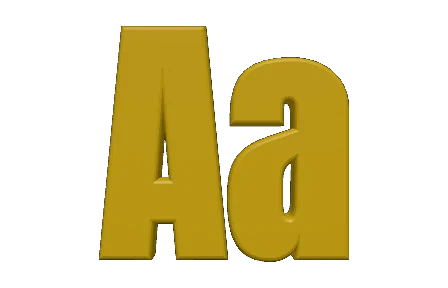
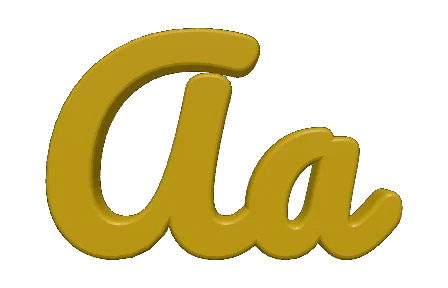
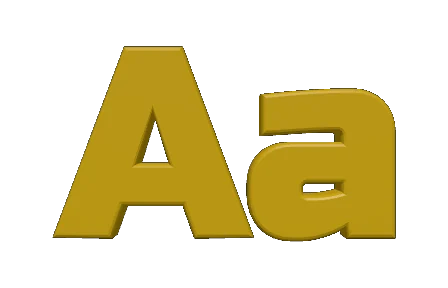
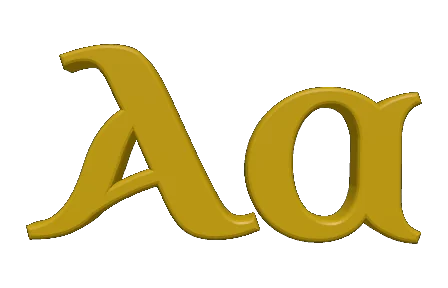
वही दो अक्षर रूपांतरण के बाद, टूल के अपने पूर्वावलोकन में बने हुए। एक भारी ग्रोटेस्क, एक ब्रश स्क्रिप्ट, एक चौकोर डिस्प्ले फ़ेस और एक ऐतिहासिक अंशियल — रूपरेखाएँ सीधे हर फ़ॉन्ट से आती हैं, इसलिए यहाँ जो दिखता है वही TextGeometry एक्सट्रूड करेगा।
समर्थित फ़ॉन्ट फ़ॉर्मेट
उन फ़ॉन्ट को ड्रॉप करें जो आपके डिज़ाइन ऐप्स और ब्राउज़र पहले से उपयोग करते हैं — कन्वर्टर सबको पढ़ता है और Three.js को चाहिए वह फ़ॉर्मेट देता है।
TTF
TrueType
सबसे आम डेस्कटॉप और वेब फ़ॉन्ट, जो क्वाड्राटिक बेज़ीये आउटलाइन पर बना है। इनपुट के रूप में पूर्ण रूप से समर्थित।
OTF
OpenType
उन्नत टाइपोग्राफी के साथ TTF का एक सुपरसेट। क्यूबिक बेज़ीये आउटलाइन और OpenType फीचर साफ़-सुथरे पार्स होते हैं।
typeface.json
आउटपुट
Three.js का अपना JSON फ़ॉन्ट फ़ॉर्मेट। डाउनलोड की गई फ़ाइल या बैच्ड .zip के रूप में भेजा जाता है।
.zip
बैच बंडल
जब कई फ़ॉन्ट कतारबद्ध होते हैं, तो एक आर्काइव हर typeface.json और एक मैनिफ़ेस्ट इकट्ठा करता है।
इनपुट
आउटपुट
आपके 3D स्टैक के साथ काम करता है
एक्सपोर्ट किया गया JSON हर लोकप्रिय Three.js एकीकरण में सीधे बैठता है — न रैपर कोड, न फ़ॉर्मेट शिम्स।
Three.js
FontLoader / TextGeometry
स्टैंडर्ड उपयोग — JSON फ़ॉर्मेट Three.js द्वारा डिज़ाइन किया गया था। लोड करें, पार्स करें, एक्सट्रूड करें।
react-three-fiber
Drei <Text3D>
JSON को Drei के Text3D घटक में पास करें और React में घोषणात्मक 3D टाइपोग्राफी पाएं।
गेम्स और WebXR
AR/VR लेबल
ब्राउज़र-आधारित गेम्स और WebXR अनुभवों में स्पष्ट 3D साइनेज और HUD भेजें।
डेटा विज़ुअलाइज़ेशन
चार्ट और डैशबोर्ड
ब्राउज़र में नक्शों, वित्तीय चार्ट और वैज्ञानिक प्लॉट के लिए कस्टम लेबल फ़ॉन्ट एक्सट्रूड करें।
अक्सर पूछे जाने वाले प्रश्न
Vextrude फ़ॉन्ट कन्वर्टर के बारे में जानने योग्य सब कुछ।
typeface.json फ़ॉन्ट क्या है?
यह Three.js का अपना JSON फ़ॉन्ट फ़ॉर्मेट है। संकलित फ़ॉन्ट फ़ाइल के बजाय, यह हर ग्लिफ़ को बेज़ीये पाथ डेटा के रूप में संग्रहीत करता है ताकि Three.js का FontLoader हर अक्षर को एक शेप में बदल सके और TextGeometry उसे वास्तविक 3D मेश में एक्सट्रूड कर सके।
क्या मेरे फ़ॉन्ट सर्वर पर अपलोड होते हैं?
नहीं। सब कुछ opentype.js और File API के ज़रिए आपके ब्राउज़र में स्थानीय रूप से चलता है। कन्वर्टर आपके ड्रॉप किए गए फ़ॉन्ट कभी अपलोड, कैश या लॉग नहीं करता।
मैं कौन-से फ़ॉन्ट फ़ॉर्मेट बदल सकता हूं?
TrueType (.ttf) और OpenType (.otf)। क्वाड्राटिक और क्यूबिक दोनों बेज़ीये आउटलाइन समर्थित हैं। केवल-बिटमैप फ़ॉन्ट और केवल-वेरिएबल अक्ष (बिना किसी स्टैटिक इंस्टेंस के) मुख्य चीज़ें हैं जिन्हें यह उपयोग नहीं कर सकता।
मैं Three.js में आउटपुट का उपयोग कैसे करूं?
इसे FontLoader से लोड करें (loader.load() या loader.parse()), लौटाई गई फ़ॉन्ट को TextGeometry में पास करें, फिर परिणामी मेश को अपने सीन में जोड़ें। react-three-fiber के साथ आप इसे Drei के <Text3D> घटक में पास कर सकते हैं।
मैं JSON आकार कैसे कम करूं?
दो लीवर: कैरेक्टर सबसेटिंग (उन लिपियों और प्रतीकों को छोड़ें जो आपको नहीं चाहिए) और बेज़ीये प्रिसिज़न (कम मूल्य थोड़े कम चिकने कर्व देते हैं लेकिन फ़ाइल बहुत छोटी होती है)। दोनों Conversion Settings पैनल में उपलब्ध हैं।
क्या मैं एक साथ कई फ़ॉन्ट बदल सकता हूँ?
हाँ। बैच ज़ोन में कई .ttf/.otf फ़ाइलें ड्रॉप करें और “Convert & Download All” पर क्लिक करें — आपको हर typeface.json के साथ एक ही .zip मिलेगी।
क्या यह व्यावसायिक उपयोग के लिए मुफ़्त है?
टूल खुद व्यक्तिगत और व्यावसायिक उपयोग के लिए मुफ़्त है। परिणामी typeface.json को पुनर्वितरित किया जा सकता है या नहीं, यह आपके फ़ॉन्ट के लाइसेंस पर निर्भर करता है — सार्वजनिक उत्पाद में JSON भेजने से पहले किसी भी व्यावसायिक फ़ॉन्ट का EULA जांचें।
क्या यह गैर-लैटिन लिपियों का समर्थन करता है?
हाँ — सिरिलिक, ग्रीक, अरबी, हीब्रू, देवनागरी, थाई, CJK और अन्य सभी साफ़ रूप से बदले जाते हैं, बशर्ते स्रोत फ़ॉन्ट में ज़रूरी लिपि के ग्लिफ़ हों।