Free Font to Typeface.json Converter
Convert TTF and OTF fonts to Three.js typeface.json instantly in your browser — 100% free, private, and no server uploads.
Click or Drop Font File Here
Supports TTF and OTF (Max 50MB)
Conversion Settings
Limits output file size by only converting specific characters.
Use if your 3D text looks inside-out.
font.ttf
Ready to convert
3D Preview
WebGLUpload a font to see preview
What is typeface.json?
It's a JSON-based font format used by Three.js `FontLoader`. Converting your TTF files allows them to be loaded asynchronously in web applications without needing complex parsing libraries at runtime.
Read the full tutorialWhat Is the Font Converter?
The Vextrude Font Converter is a free browser-based tool that turns any TTF or OTF font into Three.js’s typeface.json format — the file 3D text libraries need to build real, extruded letters. Drop a font in, tweak character sets and Bézier precision, and download a ready-to-use JSON in one click. Everything runs locally, so your fonts never leave your machine.
How to Convert a Font to typeface.json
Go from a raw font file to a Three.js-ready typeface.json in four simple steps — entirely in your browser.
Upload Font
Drop a .ttf or .otf file (or click to browse). Batch upload works too — add several fonts at once.
Adjust Settings
Pick the character subset (Latin, Cyrillic, symbols…) and Bézier precision to trim file size.
Live 3D Preview
Rotate an extruded 3D sample of the loaded font before you commit — catch glyph issues early.
Download
Save the typeface.json, copy it to your clipboard, or batch-export several fonts as a .zip.
Why Use the Vextrude Font Converter?
Built for developers and designers who need fast, private font conversion for the web.
100% Private & Secure
Everything happens locally in your browser using opentype.js. Your fonts never touch a server — no upload, no tracking, no analytics on your files.
Instant Conversion
Drop a font, get a typeface.json back in a fraction of a second. No queues, no server round-trips, no daily limits.
Batch Convert
Drop a dozen fonts at once and download them all as a single .zip — great for building a shared font library for a game or site.
Character Subsetting
Ship only the glyphs you need. Trim non-Latin scripts or heavy symbol sets and the exported JSON shrinks accordingly — real bytes off your bundle.
Three.js Ready
The output loads straight into FontLoader / TextGeometry (and Drei’s <Text3D> in react-three-fiber) with zero conversion or wrapper code.
Forever Free
No signup, no watermark, and no file-size paywall. Free for personal and commercial use on every font you own the rights to convert.
Fonts & typeface.json Basics
Everything you need to know about turning a font file into 3D-ready glyph data.
What Is typeface.json?
A JSON file that stores every glyph in a font as a series of Bézier commands (moveTo, lineTo, quadraticCurveTo, cubicCurveTo). Three.js’s FontLoader turns those paths into ShapeGeometry — which TextGeometry then extrudes into real 3D letters. It’s the format between “font file” and “3D mesh”.
Why Not Load TTF Directly?
Three.js’s TextGeometry needs a specific shape structure it can extrude. Raw TTF/OTF files carry a lot Three doesn’t use (hinting, kerning tables, OpenType features), so shipping them straight to the browser wastes bandwidth and forces every visitor to parse a font just to draw a headline.
Bézier Precision
Bézier precision (or curve segments) controls how smooth the glyph outlines are. Higher = smoother 3D letters, but a larger JSON. For UI labels and titles, 6–8 is usually indistinguishable from the source; hero shots can push it to 12–16.
Character Subsetting
Real fonts often carry thousands of glyphs — Latin, Cyrillic, Greek, CJK, symbols, ligatures. If you only need “VEXTRUDE 2026”, subsetting drops the rest before export. A Latin-only export of a 4 MB CJK font can shrink to a handful of KB.
Licensing & Fair Use
Only convert fonts you have the rights to embed. Most commercial fonts allow web use but not redistribution as raw glyph data — read the EULA. Open-source fonts (SIL Open Font License, Apache) are safest for both apps and shared repositories.
Using the Output
Load with FontLoader.parse() if you already have the JSON in memory, or FontLoader.load() if fetching. Pass the returned font to TextGeometry, add a material, extrude, done.
Four converted faces
rendered in this tool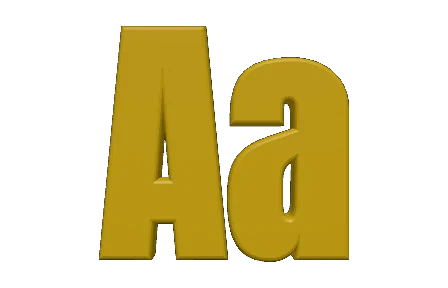
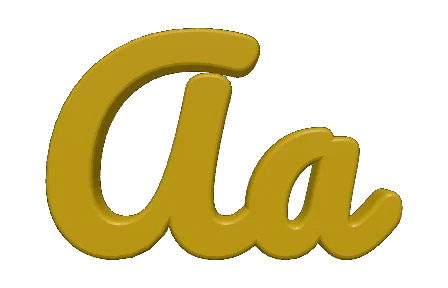
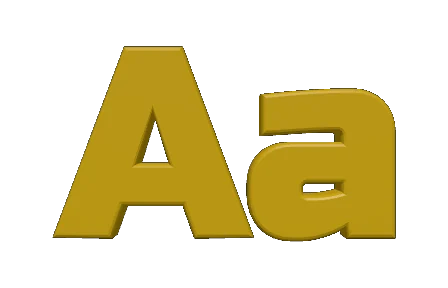
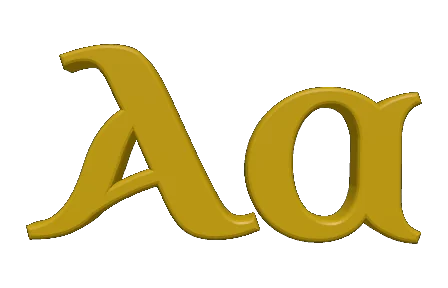
The same two letters after conversion, drawn by the tool’s own preview. A heavy grotesque, a brush script, a squared display face and a historical uncial — the outlines come straight from each font, so what you see here is what TextGeometry will extrude.
Supported Font Formats
Drop the fonts your design apps and browsers already use — the converter reads them all and outputs the format Three.js needs.
TTF
TrueType
The most common desktop and web font, built on quadratic Bézier outlines. Fully supported as input.
OTF
OpenType
A superset of TTF with advanced typography. Cubic Bézier outlines and OpenType features are parsed cleanly.
typeface.json
Output
Three.js’s own JSON font format. Ships as either a downloaded file or a batched .zip.
.zip
Batch Bundle
When several fonts are queued, one archive collects every typeface.json plus a manifest.
Input
Output
Works With Your 3D Stack
The exported JSON drops straight into every popular Three.js integration — no wrapper code, no format shims.
Three.js
FontLoader / TextGeometry
The canonical use — the JSON format was designed by Three.js. Load, parse, extrude.
react-three-fiber
Drei <Text3D>
Pass the JSON to Drei’s Text3D component and get declarative 3D typography in React.
Games & WebXR
AR/VR labels
Ship crisp 3D signage and HUDs in browser-based games and WebXR experiences.
Data Viz
Charts & dashboards
Extrude custom label fonts for maps, financial charts, and scientific plots in the browser.
Frequently Asked Questions
Everything you need to know about the Vextrude Font Converter.
What is a typeface.json font?
It’s Three.js’s own JSON font format. Instead of a compiled font file, it stores every glyph as Bézier path data so Three.js’s FontLoader can turn each letter into a shape and TextGeometry can extrude it into a real 3D mesh.
Is my font uploaded to a server?
No. Everything runs locally in your browser via opentype.js and the File API. The converter never uploads, caches, or logs the fonts you drop in.
Which font formats can I convert?
TrueType (.ttf) and OpenType (.otf). Both quadratic and cubic Bézier outlines are supported. Bitmap-only fonts and variable-only axes (without any static instance) are the main things it can’t use.
How do I use the output in Three.js?
Load it with FontLoader (loader.load() or loader.parse()), pass the returned font to TextGeometry, then add the resulting mesh to your scene. With react-three-fiber you can feed it to Drei’s <Text3D> component.
How do I shrink the JSON size?
Two levers: character subsetting (drop scripts and symbols you don’t need) and Bézier precision (lower values give slightly less-smooth curves but a much smaller file). Both are exposed in the Conversion Settings panel.
Can I convert multiple fonts at once?
Yes. Drop several .ttf/.otf files into the batch zone and hit “Convert & Download All” — you’ll get a single .zip with each typeface.json inside.
Is it free for commercial use?
The tool itself is free for personal and commercial use. Whether the resulting typeface.json can be redistributed depends on your font’s license — check the EULA of any commercial font before shipping the JSON in a public product.
Does it support non-Latin scripts?
Yes — Cyrillic, Greek, Arabic, Hebrew, Devanagari, Thai, CJK and more all convert cleanly, as long as the source font contains glyphs for the script you need.