STL、GLB、OBJ、3MF、PLYファイルをここにドロップ
またはクリックして参照 — モデルはプリンターベッドに配置されます
レイヤー 0 / 0
Print Control は、完全にブラウザ内で動作する無料のオンライン3Dプリントスライサーです。インストール、アカウント、アップロードは不要です。STL、OBJ、3MF、PLY、GLB モデルを印刷可能な G-code に変換し、レイヤーごとのスライスプレビュー、調整可能なレイヤー高さとインフィル、サポート生成、Ender 3、Prusa、Bambu Lab、Voron などの人気 FDM プリンター向けプリセットを備えています。ファイルはお使いのデバイス上でローカルに処理され、サーバーに送信されることはありません。
3Dモデルから印刷準備完了のG-codeへ4つの簡単なステップで — すべてブラウザで。
STL、GLB、OBJ、3MF、PLY ファイルをドロップするか、「印刷」ボタンを使って SVG→3D コンバーターから直接送信します。
プリンターを選択し、レイヤー高さ、インフィル密度、温度、サポート、接着タイプを設定します。
リアルタイムのスライスプレビューで印刷の各レイヤーを確認できます。可変速度でアニメーションを再生できます。
ペリメーター、インフィル、温度制御を含む印刷準備完了のG-codeを生成 — ダウンロードして印刷。
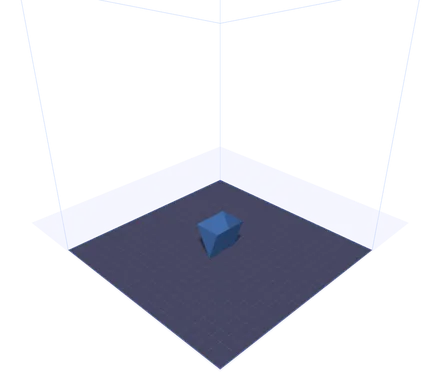
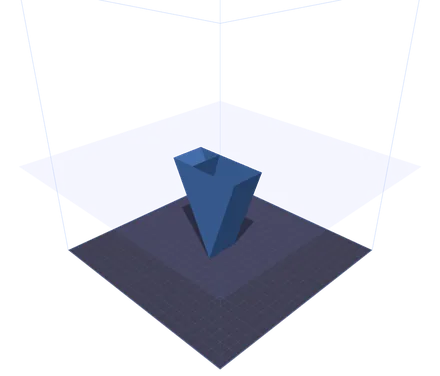
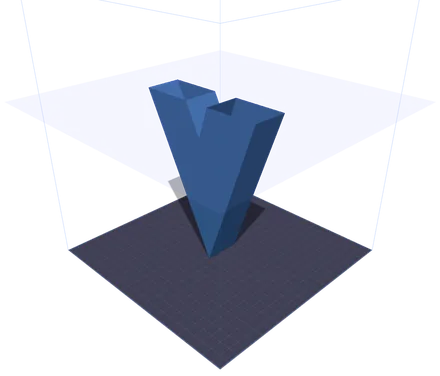
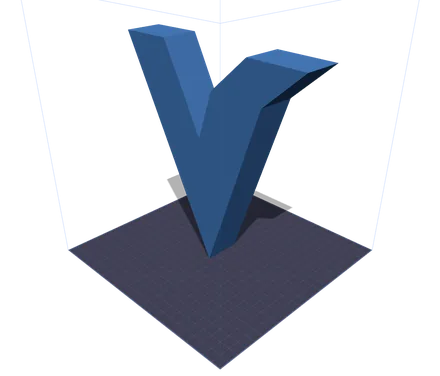
同じモデルを、印刷の4つの時点で見たものです。半透明の面はノズルが到達した高さで、その上はすべて隠されます。上のほうでは断面が2つの島に分かれます。Vの左右の腕です。スライサーがその間の移動経路を考え始めるのがこの瞬間です。スライダーを動かせば、フィラメントを使い切ってからではなく、使う前にその地点を確認できます。
リアルタイム3D表示と即時 G-code 生成を備えた、完全ブラウザベースの印刷準備ツールです。
グリッド線付きの正確な3Dプリンターベッド上にモデルを表示します。Ender 3、Prusa i3、Bambu Lab X1、Voron 2.4、およびカスタムベッド寸法に対応。
レイヤー高さ、ノズル径、印刷速度、インフィル密度とパターン、ノズルとベッドの温度、サポート構造、定着タイプを細かく調整できます。
リアルタイムの GPU アクセラレーテッドクリッピングプレーンで印刷をレイヤーごとに確認できます。1x、2x、5x の速度でアニメーション再生し、細部まで検査できます。
開始/終了シーケンス、外周トレース、グリッドインフィル、適切な押出計算を含む完全な G-code ファイルを生成します。ダウンロードしてプリンターに直接送信できます。
SVG→3D コンバーターで「印刷」ボタンをクリックすると、モデルは IndexedDB 経由で即座に転送されます。ダウンロードや再アップロードは不要です。
インストール不要、クラウドへのアップロードも不要。すべて WebGL と Three.js を使ってブラウザ内でローカルに動作します。ファイルがお使いのマシンから出ることはありません。
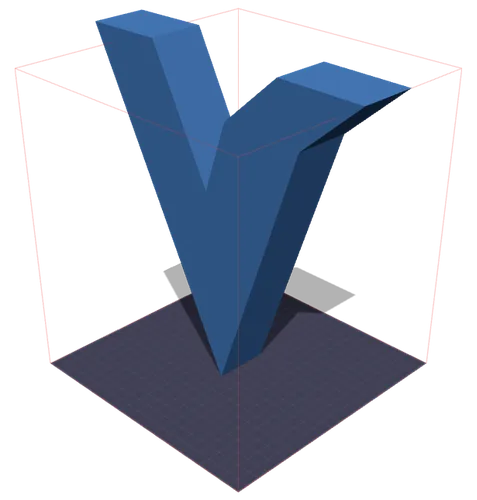
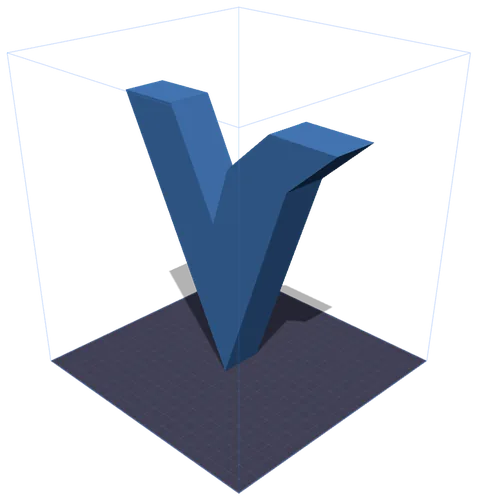
左:モデルが造形範囲をはみ出した瞬間に、枠が赤く変わります。右:「サイズ調整」を一度押すと、収まるまで比率を保ったまま縮小されます。ミリ数はモデル自身の実測バウンディングボックスから取っています。GLBは現実の単位を持たないため、ファイルが名乗るサイズと実際に印刷されるサイズが一致することはめったにありません。
FDM 3Dプリント用にモデルを準備するために知っておくべきすべて。
印刷準備(print prep)とは、3Dモデルを取り込み、特定の3Dプリンター向けに設定するプロセスです。これには、モデルをビルドプレート上に配置すること、レイヤー高さやインフィルなどの印刷品質設定を選択すること、フィラメントの温度を選ぶこと、そして最終的にプリンターの動き方を正確に指示する G-code 命令を生成することが含まれます。
G-code は、CNC 機械や3Dプリンターを制御するための標準言語です。各行にはコマンドが含まれます。直線移動用の G1、温度設定用の M104、軸の原点復帰用の G28 など。Print Control ツールは、開始シーケンス、レイヤーごとの外周、インフィルパターン、終了シーケンスを含む完全な G-code を生成し、ほとんどの FDM プリンターに対応します。
PLA(200/60 °C)は最も印刷しやすく、プロトタイプや装飾モデルに最適です。PETG(235/80 °C)は耐久性と耐熱性に優れています。ABS(240/100 °C)は丈夫ですが、密閉型プリンターが必要です。TPU(225/50 °C)は柔軟で、スマホケースやガスケットに最適です。素材プリセットボタンを使えば、適切な温度を即座に設定できます。
レイヤー高さは印刷品質と速度を左右します。0.1 mm のレイヤーは滑らかな表面になりますが時間がかかります。0.2 mm は品質と速度の標準的なバランスです。0.3 mm 以上のレイヤーは印刷が速くなりますが、レイヤーラインが目立ちます。スライスプレビューでは、任意の設定でモデルのレイヤー数を正確に確認できます。
グリッド(Grid)はあらゆる方向にバランスの取れた強度を提供します。ライン(Lines)は最も速く印刷できますが、一方向の軸には弱くなります。トライアングル(Triangles)は優れた構造剛性を提供します。ハニカム(Honeycomb)は最高の強度対重量比を提供します。装飾的な印刷には 10〜20% のインフィルで十分です。機能部品には通常 40〜60% が必要です。
45°を超えるオーバーハングにはサポートを有効にしてください。垂れ下がりや印刷失敗を防ぎます。ベッド定着には、スカート(Skirt)がモデルに触れずにノズルをならします。ブリム(Brim)は密着性を高める平らな縁を追加します。ラフト(Raft)は厚いベース層を印刷し、ABS のような反りやすい素材に役立ちます。
人気のFDMプリンター用の組み込みプリセット、カスタムベッド寸法をサポート。
220 × 220 × 250 mm
最も人気のある低価格 FDM プリンター。初心者に最適です。
250 × 210 × 210 mm
信頼性と印刷品質の業界標準。
256 × 256 × 256 mm
自動キャリブレーション搭載の高速 CoreXY。
350 × 350 × 350 mm
大型で高品質な印刷向けのオープンソース CoreXY。
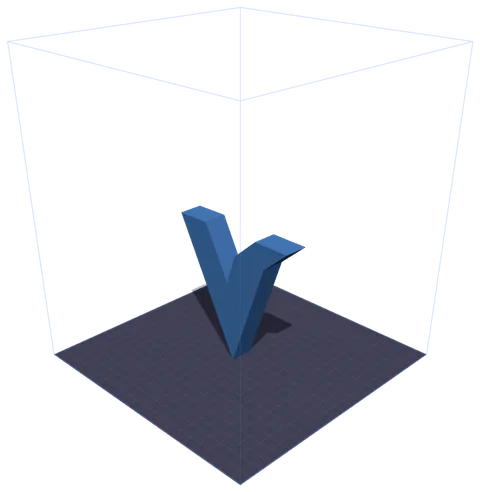
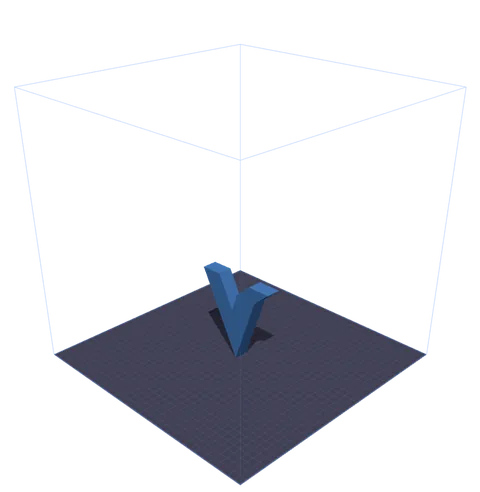
モデルは1つ、プリセットは2つ。ワイヤーフレームの箱は機種ごとの実際の造形範囲で、ベッドのまわりに実寸で描かれます。残りの余裕は計算するものではなく、見えるものになります。4機種がプリセット済みで、それ以外は「カスタム」を選んでX・Y・Zを入力します。
3Dプリント管理ツールに関するよくある質問。
はい、完全に無料です。Print Control は完全にブラウザ内で動作します。サブスクリプション、登録、使用制限は一切ありません。3Dモデルはローカルで処理され、サーバーにアップロードされることはありません。
生成される G-code には、適切な開始/終了シーケンス、温度コマンド、原点復帰、押出計算が含まれ、ほとんどの Marlin ベースの FDM プリンターと互換性があります。新しいマシンで初めて印刷する前には、必ず G-code を確認してください。
Print Control は、STL(最も一般的な3Dプリント形式)、GLB(SVG→3D コンバーターが使用するバイナリ glTF)、OBJ(Wavefront)、3MF(色と素材データを含む 3D Manufacturing Format)、PLY(3Dスキャンで一般的な Polygon File Format)に対応します。ファイルをドラッグ&ドロップするか、アップロードボタンを使用してください。
SVG→3D コンバーターで「印刷」ボタンをクリックすると、モデルは GLB blob としてエクスポートされ、ブラウザの IndexedDB に一時的に保存されます。Print Control は起動時に保留中のモデルを自動的に検出して読み込みます。ファイルのダウンロードは不要です。
スライスプレビューは、GPU アクセラレーテッドクリッピングプレーンを使用して、各レイヤー高さでモデルを切断します。スライダーですべてのレイヤーを確認したり、アニメーションを再生して印刷全体を下から上まで見ることができます。
はい。プリンターのドロップダウンから「カスタム」を選択し、ベッド寸法(X、Y、Z をミリメートル単位)を入力します。プリンターベッドとビルドボリュームのワイヤーフレームが、お使いのプリンターの正確な仕様に合わせて更新されます。
グリッド(Grid)は最適な汎用パターンです。剛性が必要な構造部品にはトライアングル(Triangles)、最高の強度対重量比にはハニカム(Honeycomb)、印刷時間を最短にしたい場合はライン(Lines)を使用してください。装飾品には通常 10〜20% の密度で十分です。