أفلت ملف STL أو GLB أو OBJ أو 3MF أو PLY هنا
أو انقر للتصفح — سيتم وضع النموذج على منصة الطباعة
طبقة 0 / 0
Print Control هي أداة تقطيع طباعة ثلاثية الأبعاد مجانية عبر الإنترنت تعمل بالكامل في متصفحك — دون تثبيت أو حساب أو رفع. تحوّل نماذج STL وOBJ و3MF وPLY وGLB إلى G-code جاهز للطباعة، مع معاينة التقطيع طبقة بطبقة، وارتفاع طبقة وحشو قابلين للتعديل، وتوليد الدعامات، وإعدادات مسبقة لطابعات FDM الشهيرة مثل Ender 3 وPrusa وBambu Lab وVoron. تُعالَج ملفاتك محليًا على جهازك ولا تُرسَل أبدًا إلى أي خادم.
من النموذج ثلاثي الأبعاد إلى G-code جاهز للطباعة في أربع خطوات بسيطة — بالكامل في متصفحك.
أفلِت ملف STL أو GLB أو OBJ أو 3MF أو PLY، أو أرسله مباشرةً من محوّل SVG إلى 3D باستخدام زر الطباعة.
اختر طابعتك، اضبط ارتفاع الطبقة وكثافة الحشو ودرجات الحرارة والدعامات ونوع الالتصاق.
تصفّح كل طبقة من طباعتك باستخدام معاينة التقطيع الفورية. شغّل الرسوم المتحركة بسرعات متغيّرة.
ولّد G-code جاهزًا للطابعة مع المحيطات والحشو وضوابط درجة الحرارة — حمّل واطبع.
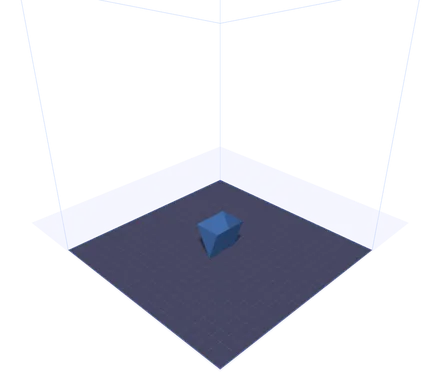
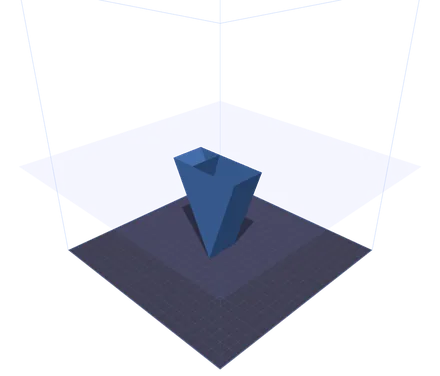
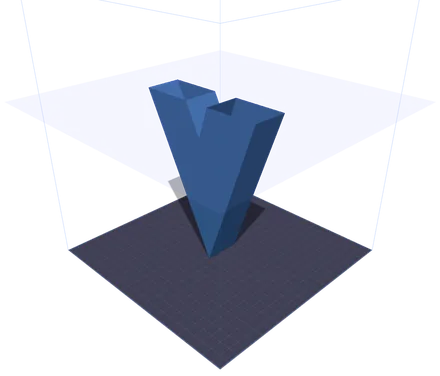
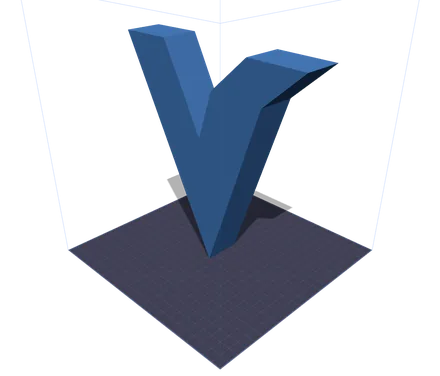
النموذج نفسه في أربع لحظات من الطباعة. المستوى الشفاف هو الارتفاع الذي بلغته الفوهة، وكل ما فوقه مخفي. وقرب الأعلى ينقسم المقطع العرضي إلى جزيرتين منفصلتين، هما ذراعا حرف V، وعندها يبدأ برنامج التقطيع في تخطيط حركات الانتقال بينهما. تحريك المنزلق هو ما يكشف لك تلك اللحظة قبل أن تصرف الخيط لا بعده.
أداة كاملة لتحضير الطباعة تعمل عبر المتصفح، مع تصوّر ثلاثي الأبعاد فوري وتوليد G-code لحظي.
شاهد نموذجك موضوعًا على منصة طابعة ثلاثية الأبعاد دقيقة بخطوط شبكية. يدعم Ender 3 وPrusa i3 وBambu Lab X1 وVoron 2.4 وأبعاد منصة مخصّصة.
اضبط بدقة ارتفاع الطبقة، وقطر الفوهة، وسرعة الطباعة، وكثافة الحشو ونمطه، ودرجات حرارة الفوهة والمنصة، وهياكل الدعم، ونوع الالتصاق.
تصفّح طباعتك طبقة بطبقة باستخدام مستوى قص معجّل بوحدة معالجة الرسوميات (GPU) وبشكل فوري. تشغيل متحرك بسرعة 1x أو 2x أو 5x لفحص كل التفاصيل.
أنشئ ملفات G-code كاملة بتسلسلات بداية/نهاية، وتتبّع المحيطات، وحشو شبكي، وحسابات بثق صحيحة. نزّلها وأرسلها مباشرةً إلى طابعتك.
انقر زر الطباعة في محوّل SVG إلى 3D، ويُنقَل نموذجك فورًا عبر IndexedDB — دون تنزيلات أو إعادة رفع.
بدون تثبيت وبدون رفع سحابي. يعمل كل شيء محليًا في متصفحك باستخدام WebGL وThree.js. لا تغادر ملفاتك جهازك أبدًا.
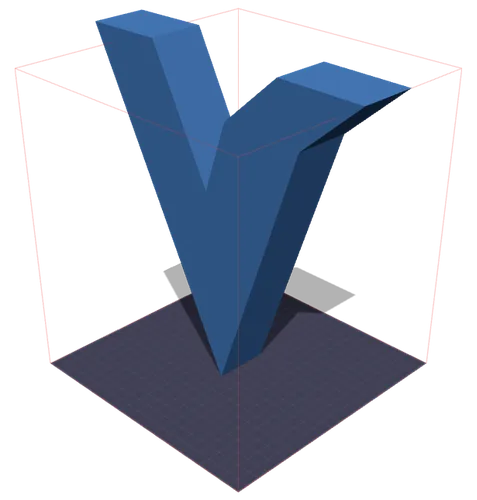
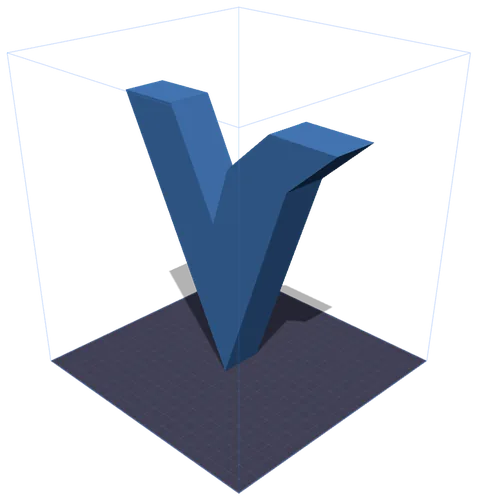
على اليمين: يتحول حيّز الطباعة إلى الأحمر بمجرد أن يخترقه النموذج. وعلى اليسار: ضغطة واحدة على «تحجيم للملاءمة» تصغّره بالتناسب حتى يستقر بداخله. والمليمترات مأخوذة من صندوق الإحاطة المقاس للنموذج نفسه — فملف GLB لا يحمل وحدة قياس حقيقية، ولهذا نادرًا ما يتطابق الحجم المعلن مع الحجم المطبوع.
كل ما تحتاج معرفته حول تحضير النماذج للطباعة ثلاثية الأبعاد بتقنية FDM.
تحضير الطباعة (print prep) هو عملية أخذ نموذج ثلاثي الأبعاد وتهيئته لطابعة ثلاثية الأبعاد محدّدة. يشمل ذلك وضع النموذج على منصة البناء، واختيار إعدادات جودة الطباعة مثل ارتفاع الطبقة والحشو، واختيار درجات الحرارة لخيطك، وأخيرًا توليد تعليمات G-code التي تخبر طابعتك بالضبط كيف تتحرك.
G-code هو اللغة القياسية المستخدمة للتحكم في آلات CNC والطابعات ثلاثية الأبعاد. يحتوي كل سطر على أمر: G1 للحركات الخطية، وM104 لضبط درجات الحرارة، وG28 لإرجاع المحاور إلى نقطة الأصل. تولّد أداة Print Control كود G-code كاملًا بتسلسلات بداية، ومحيطات طبقة بطبقة، وأنماط حشو، وتسلسلات نهاية، جاهزًا لمعظم طابعات FDM.
مادة PLA (200/60 °م) هي الأسهل في الطباعة — رائعة للنماذج الأولية والنماذج الزخرفية. توفّر PETG (235/80 °م) متانة ومقاومة حرارة أفضل. مادة ABS (240/100 °م) قوية لكنها تتطلب طابعة مغلقة. مادة TPU (225/50 °م) مرنة، مثالية لأغطية الهواتف والحشيات. استخدم أزرار الإعداد المسبق للمواد لضبط درجات الحرارة الصحيحة على الفور.
يحدّد ارتفاع الطبقة جودة الطباعة وسرعتها. تنتج الطبقات بسمك 0.1 مم أسطحًا ملساء لكنها تستغرق وقتًا أطول. 0.2 مم هو التوازن القياسي بين الجودة والسرعة. تُطبَع الطبقات بسمك 0.3 مم فأكثر بشكل أسرع لكنها تُظهر خطوط طبقات مرئية. تتيح لك معاينة التقطيع رؤية عدد الطبقات التي سيحتوي عليها نموذجك بالضبط عند أي إعداد.
توفّر الشبكة (Grid) قوة متوازنة في جميع الاتجاهات. الخطوط (Lines) هي الأسرع في الطباعة لكنها أضعف على محور واحد. توفّر المثلثات (Triangles) صلابة هيكلية ممتازة. يمنح قرص العسل (Honeycomb) أفضل نسبة قوة إلى وزن. للطباعات الزخرفية، يكفي حشو بنسبة 10-20%. تحتاج الأجزاء الوظيفية عادةً إلى 40-60%.
فعّل الدعامات للنتوءات التي تتجاوز 45° — فهي تمنع التدلّي والطباعات الفاشلة. لالتصاق المنصة، تُهيّئ التنورة (Skirt) الفوهة دون لمس النموذج. تضيف الحافة (Brim) إطارًا مسطحًا لالتصاق أفضل. يطبع الطوف (Raft) طبقة قاعدية سميكة، مفيدة للمواد المعرّضة للالتواء مثل ABS.
إعدادات مسبقة مدمجة لطابعات FDM الشهيرة مع دعم أبعاد السرير المخصصة.
220 × 220 × 250 mm
أشهر طابعة FDM اقتصادية. رائعة للمبتدئين.
250 × 210 × 210 mm
المعيار القياسي في الموثوقية وجودة الطباعة.
256 × 256 × 256 mm
طابعة CoreXY عالية السرعة مع معايرة تلقائية.
350 × 350 × 350 mm
طابعة CoreXY مفتوحة المصدر للطباعات الكبيرة وعالية الجودة.
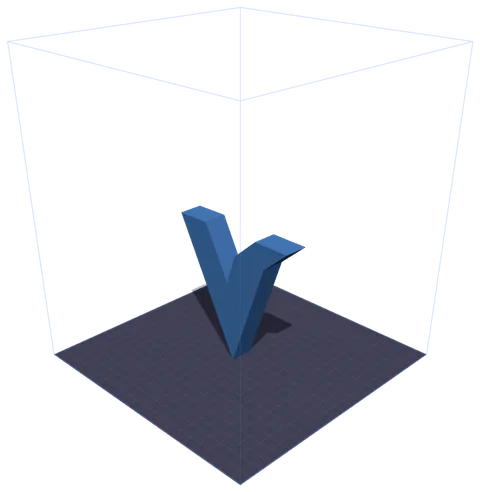
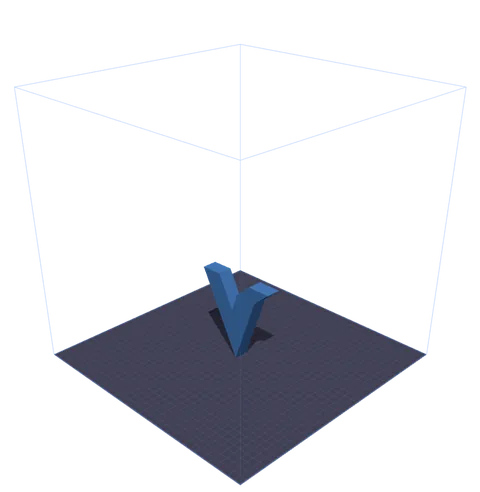
نموذج واحد وإعدادان مسبقان. القفص السلكي هو حيّز البناء الحقيقي للجهاز، مرسومًا بالمقياس حول المنصة، فترى المساحة المتبقية بدل أن تحسبها. أربع طابعات مضبوطة مسبقًا؛ ولأي طابعة أخرى اختر «مخصص» وأدخل X وY وZ.
أسئلة شائعة حول أداة التحكم في الطباعة.
نعم، مجانية تمامًا. تعمل Print Control بالكامل في متصفحك — لا اشتراكات ولا تسجيلات ولا حدود استخدام. تُعالَج نماذجك ثلاثية الأبعاد محليًا ولا تُرفَع أبدًا إلى أي خادم.
يتضمّن كود G-code المُولَّد تسلسلات بداية/نهاية مناسبة، وأوامر حرارة، وإرجاعًا لنقطة الأصل، وحسابات بثق متوافقة مع معظم طابعات FDM المبنية على Marlin. راجع دائمًا كود G-code قبل الطباعة لأول مرة على آلة جديدة.
تقبل Print Control صيغ STL (أكثر صيغ الطباعة ثلاثية الأبعاد شيوعًا)، وGLB (glTF ثنائي، يستخدمه محوّل SVG إلى 3D)، وOBJ (Wavefront)، و3MF (3D Manufacturing Format مع بيانات اللون والمادة)، وPLY (Polygon File Format، شائعة في المسح الضوئي ثلاثي الأبعاد). اسحب الملفات وأفلِتها أو استخدم زر الرفع.
عند النقر على زر الطباعة في محوّل SVG إلى 3D، يُصدَّر نموذجك بصيغة GLB blob ويُخزَّن مؤقتًا في IndexedDB الخاص بمتصفحك. تكتشف Print Control النموذج المُعلَّق وتحمّله تلقائيًا عند فتحها — دون الحاجة إلى تنزيل ملفات.
تستخدم معاينة التقطيع مستوى قص معجّلًا بوحدة معالجة الرسوميات (GPU) لتقطيع نموذجك عند كل ارتفاع طبقة. يمكنك التنقل عبر جميع الطبقات باستخدام شريط التمرير أو تشغيل رسم متحرك لتصوّر الطباعة بأكملها من الأسفل إلى الأعلى.
نعم. اختر «مخصّص» من قائمة الطابعات المنسدلة وأدخِل أبعاد منصتك (X وY وZ بالمليمتر). سيتم تحديث منصة الطابعة وإطار حجم البناء ليطابقا مواصفات طابعتك بالضبط.
الشبكة (Grid) هي أفضل نمط للأغراض العامة. استخدم المثلثات (Triangles) للأجزاء الهيكلية التي تحتاج إلى صلابة، وقرص العسل (Honeycomb) لأفضل نسبة قوة إلى وزن، والخطوط (Lines) عندما تريد أقصر وقت طباعة. للأغراض الزخرفية، تكفي عادةً كثافة 10-20%.