Başlamak için bir height map bırakın
Normal Harita Oluşturucu nedir?
Tamamen tarayıcınızda çalışan ücretsiz bir çevrimiçi normal harita oluşturucu. Bir height map bırakın; GPU'nuzda gerçek zamanlı olarak altı PBR haritası — normal, yer değiştirme, ortam örtme, speküler, pürüzlülük ve eğrilik — üretir, canlı 3D önizleme ile. Görselleriniz cihazınızda yerel olarak işlenir ve asla bir sunucuya gönderilmez.
Çevrimiçi normal harita nasıl yapılır
Height map'ten tam bir PBR setine dört adımda — hesap yok, kurulum yok, yükleme yok.
Bir height map yükleyin
Gri tonlamalı bir height map veya herhangi bir dokuyu sürükleyin ya da göz atmak için tıklayın (PNG, JPG, WEBP). Saydam PNG'ler desteklenir.
Haritaları ayarlayın
Her haritanın kendi canlı kaydırıcısı vardır — şiddet, bulanıklık/keskinlik, AO, speküler, yer değiştirme, pürüzlülük ve eğrilik.
3D önizleme
Malzemenin bir düzlem, küre, küp veya silindir üzerinde anında güncellenmesini izleyin ya da herhangi bir haritayı kaydırma ve yakınlaştırma ile inceleyin.
İndir
Bir haritayı veya tüm seti ZIP olarak kaydedin — PNG, JPG veya WEBP, saydamlık korunur.
Yükseklik haritasından normal haritaya
bu araçta oluşturuldu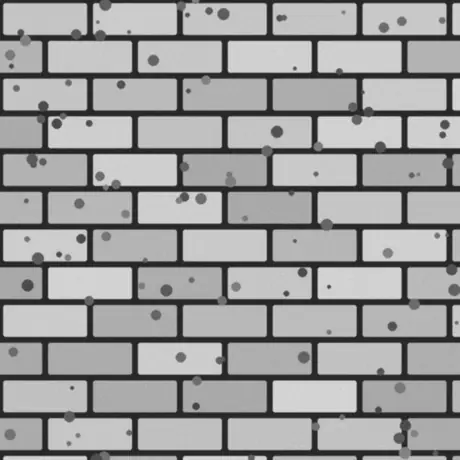
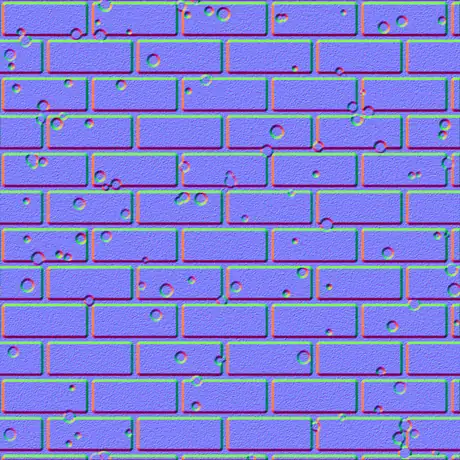
Girdi gri tonlamalı bir yükseklik haritası, çıktı teğet uzayda bir normal harita. Açık pikseller yüksek, koyu pikseller alçak sayılır; üreteç bu eğimi bir gölgelendiricinin okuduğu kırmızı ve yeşil kanallara çevirir. Her şey sizin GPU’nuzda çalışır ve görsel tarayıcıdan hiç çıkmaz.
Neden bu normal harita oluşturucuyu kullanmalısınız
Çoğu çevrimiçi oluşturucu dokunuzu sunucuya yükler ve yavaşça işler. Bu ise tarayıcıda GPU'nuzda çalışır ve her şeyi korur.
Hiçbir şey yüklenmez
Görüntü doğrudan diskten okunur ve WebGL ile yerel olarak işlenir. Hiçbir şey iletilmez, bu yüzden ağ kapalıyken de çalışır.
GPU'nuzda gerçek zamanlı
Her harita fragment shader'larla üretilir; bir kaydırıcıyı hareket ettirmek altı haritayı birkaç milisaniyede günceller — 4K'da bile.
Altı harita, her biri ayarlanabilir
Normal, yer değiştirme, ortam örtme, speküler, pürüzlülük ve eğrilik — her birinin kendi canlı denetimi var.
Saydamlık kesme olarak korunur
Alfa kanallı bir PNG bırakın; her harita, silueti kabartılmış temiz bir kesme olarak çıkar — çıkartmalar ve sprite'lar için ideal.
Motora hazır çıktı
OpenGL (+Y) veya DirectX (-Y) normalleri, Sobel veya Scharr ayrıntısı, bulanıklık ve keskinlik, ayrıca glTF, Unity ve Unreal için metal-rough pürüzlülük haritası.
Ücretsiz, kayıt yok
Hesap yok, filigran yok ve cihazınızın bellekte tutabileceğinin ötesinde dosya boyutu sınırı yok.
Ürettiği altı harita
Tek bir height map eksiksiz bir fizik tabanlı materyal üretir — bir normal map, bir displacement map, bir ambient occlusion haritası ve üç tane daha. Aşağıda her birinin ne olduğu ve nerede kullanıldığı anlatılıyor.
| Harita | Nedir | En uygun |
|---|---|---|
| Normal | Teğet uzayında RGB yönleri, OpenGL (+Y) veya DirectX (-Y). | Gerçek zamanlı ışıkta yüzey ayrıntısını taklit etmek. |
| Yer değiştirme | Kontrastı ayarlanabilir yükseklik verisi. | Gerçek geometri yer değiştirmesi, tessellation veya parallax. |
| Ortam örtme | Çatlaklarda yumuşak temas gölgeleri. | Boşluklarda inandırıcı, oturmuş gölgelendirme. |
| Speküler | Yüzeyin ışığı yakaladığı yerler, yükseklikten türetilir. | Eski speküler / gloss gölgelendirme iş akışları. |
| Pürüzlülük | Yerel yüzey ayrıntısından mikro pürüzlülük. | glTF, Unity, Unreal'daki metallic-roughness iş akışı. |
| Eğrilik | Dışbükey/içbükey boşluk haritası — parlak kenarlar, koyu çatlaklar. | Kenar aşınması, kir ve maske üretimi. |
Tek görselden üretilen haritalar
bu araçta oluşturuldu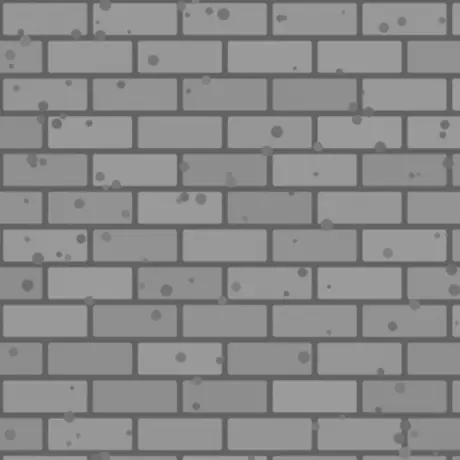
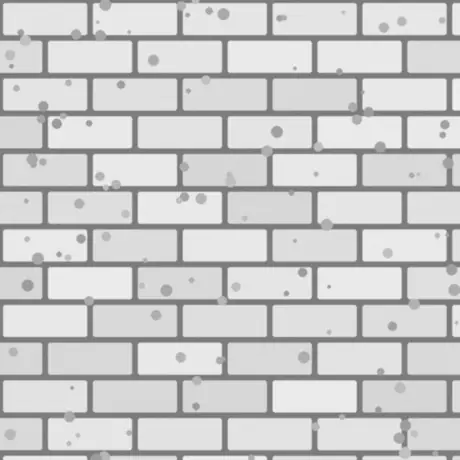
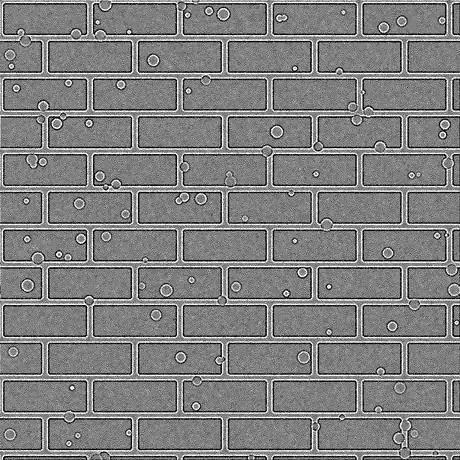
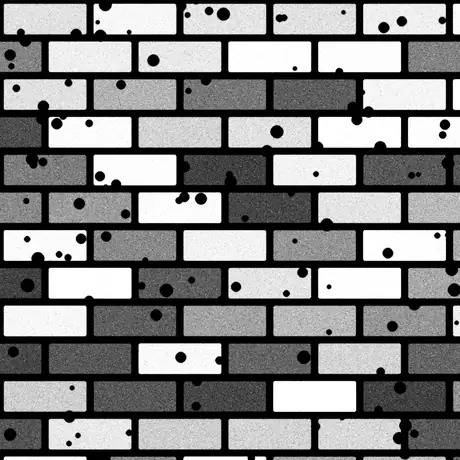
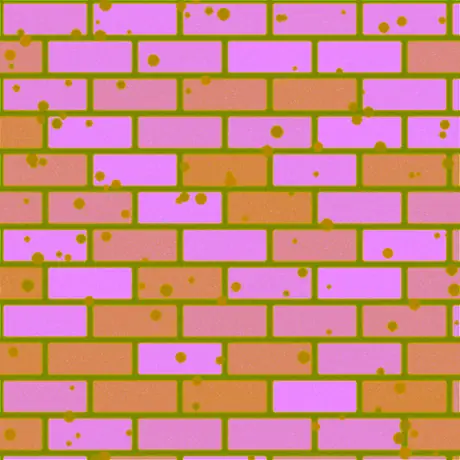
Tek bir yükseklik haritasından türeyen sekiz haritanın altısı. Pürüzlülük ve speküler harita da üretilir — ancak varsayılan şiddette speküler harita yükseklik değerlerini olduğu gibi geçirir. ORM ise ortam örtme, pürüzlülük ve metalikliği tek bir görselin kırmızı, yeşil ve mavi kanallarına paketler; glTF’nin beklediği düzen budur.
Yaygın kullanımlar
Tuğla, taş ve karolar
Fotoğraflanmış veya boyanmış bir height map'i normal ve AO haritasına dönüştürün; böylece düz duvarlar ve zeminler gerçek duvar örgüsü gibi ışığı yakalar — ek geometri gerekmez.
Bir PNG'den logolar ve çıkartmalar
Saydam bir PNG bırakın; normal, pürüzlülük ve eğrilik haritaları, şekli kabartılmış temiz kesmeler olarak çıkar ve başka bir malzemenin üzerine katmanlanmaya hazırdır.
glTF için bir metal-rough seti
Unity, Unreal, Godot, Blender ve glTF standardının kullandığı metallic-roughness iş akışı için normal, pürüzlülük ve AO'yu birlikte dışa aktarın.
Kenar aşınması ve kir maskeleri
Eğrilik ve AO haritalarını, shader'ınızda veya doku aracınızda maske olarak kullanarak kenarlarda çizikler ve çatlaklarda kir oluşturun.
Sıkça sorulan sorular
Tarayıcıda normal harita oluşturmayla ilgili en sık sorulanlar.
Görsellerim herhangi bir yere yükleniyor mu?
Hayır. Oluşturucu görselinizi doğrudan tarayıcıda okur ve GPU'nuzda WebGL ile yerel olarak işler. Hiçbir şey sunucuya gönderilmez; bu yüzden sayfa yüklendikten sonra çevrimdışı da çalışır.
Hangi haritaları oluşturabilirim?
Altı: normal, yer değiştirme, ortam örtme, speküler, pürüzlülük ve eğrilik. Her birinin kendi kaydırıcısı var; tek bir haritayı ya da tüm seti bir kerede ZIP olarak PNG, JPG veya WEBP biçiminde indirebilirsiniz.
Hızlı mı? GPU'mu kullanıyor mu?
Evet. Tüm haritalar ekran kartınızda WebGL fragment shader'larıyla üretilir; bir kaydırıcıyı hareket ettirmek her haritayı birkaç milisaniyede — 4K'da bile — gecikmesiz ve sunucuya gitmeden günceller.
Saydam (PNG) görsellerle çalışır mı?
Evet. Saydamlık korunur: üretilen her harita, görselinizin alfa'sıyla eşleşen temiz bir kesme olur ve silueti kabartılır. PNG ve WEBP saydamlığı korur; JPG beyaz üzerine düzleştirilir.
OpenGL ve DirectX normal haritaları arasındaki fark nedir?
Yeşil (Y) kanalının yönünde farklılık gösterirler. OpenGL (+Y) Unity, Blender ve glTF tarafından; DirectX (-Y) Unreal Engine ve birçok oyun tarafından kullanılır. İhtiyacınız olan motor ön ayarını seçin ya da Y'yi ters çevirin.
Bunları Unity, Unreal veya Blender'da kullanabilir miyim?
Evet. Normal harita hem OpenGL hem DirectX düzeninde gelir; pürüzlülük haritası ise Unity, Unreal, Godot, Blender ve glTF'in kullandığı metallic-roughness iş akışına uygundur. Kayıpsız kalite için PNG olarak dışa aktarın.
Hangi görselle başlamalıyım?
Gri tonlamalı bir height map (bump map) en iyi sonucu verir: açık alanlar yüksek, koyu alanlar alçak sayılır. Bir diffuse doku da verebilirsiniz; araç yüksekliği parlaklıktan tahmin eder, ardından Bulanıklık/Keskinlik ve ayrıntı filtresiyle ayarlayın.
İlgili araçlar
3D Görüntüleyici
STL, OBJ, GLB ve daha fazlasını stüdyo aydınlatması, animasyon oynatma ve yüksek çözünürlüklü render'larla açıp inceleyin.
3D Dosya Dönüştürücü
STL, OBJ, GLTF, GLB, PLY, FBX ve USDZ arasında tarayıcıda dönüştürün; rig'ler ve animasyonlar korunur.