What is a 3MF to STL converter?
3MF is the file that Bambu Studio, OrcaSlicer, PrusaSlicer and Cura save. STL is the plain mesh that almost every slicer, CAD program, mesh editor and print service accepts. This converter opens your 3MF in the browser — slicer project files included — and saves its shapes as a single STL. Nothing is uploaded: the file never leaves your device.
How to convert 3MF to STL
Four steps — no account, no install and no upload.
Open your 3MF
Drag the file onto the page or click to browse. Project files saved by Bambu Studio, OrcaSlicer or PrusaSlicer work too.
Check it
Every object appears together, with its real dimensions in millimetres, so you can confirm nothing is missing before you export.
Adjust if needed
Rescale, fit the longest side to a size, rotate or drop the model onto the floor. Files saved in inches, centimetres or metres are converted to millimetres for you.
Download the STL
STL is already selected. Press Convert & Download and the file is saved straight to your device.
Colour in, shape out
rendered in this tool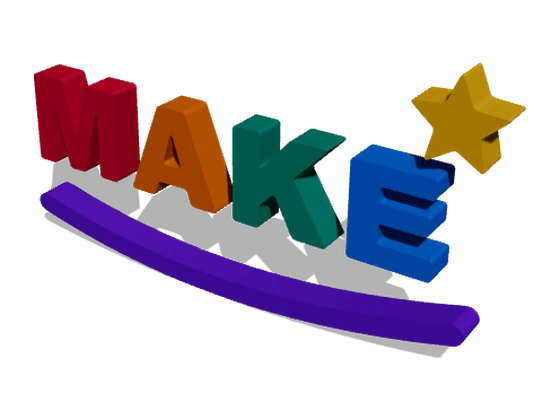
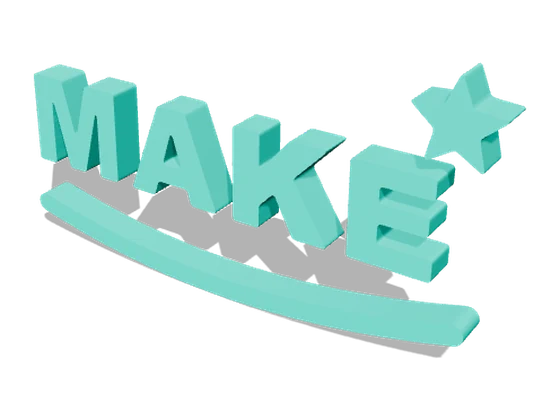
The same model before and after: the 3MF carries six colours, the STL only the shape. Every one of its 2,752 triangles and its size — 87.6 × 47.5 × 6 mm — come through unchanged.
Why convert 3MF to STL here
Built for the 3MF files that 3D-printing software actually produces — not just the textbook ones.
Bambu and Orca project files
Slicer project files keep each part in a separate file inside the 3MF, which many converters cannot read. This one stitches the parts back together before converting.
Every object in one STL
Multi-part models come out as a single STL, with every part in the position it had in the file.
Real size, in millimetres
Files saved in inches, centimetres or metres are converted to millimetres automatically, and the dimensions are shown before you export.
Nothing is uploaded
The file is read and converted in your browser and saved straight back to your device. It never reaches a server.
Fix it before you export
Rotate, rescale, fit to a target size or drop the model onto the floor, so the STL lands in your slicer ready to print.
Free, no watermark
No signup and no watermark. Convert files right in your browser.
What changes when you convert 3MF to STL
STL stores only the shape. Everything else a 3MF can carry stays behind — here is exactly what.
| What | 3MF | STL after converting |
|---|---|---|
| Shape (triangle mesh) | Yes | Yes — every triangle is kept |
| Several objects | Separate objects | Merged into one mesh, each part in its place |
| Colours and materials | Yes | No — STL has no colour |
| Unit of measurement | Stored in the file | None — converted to millimetres, which slicers expect |
| Print settings, plates, supports | In slicer project files | Not carried over |
| Opens in | Modern slicers | Almost every slicer, CAD and mesh tool |
When you need STL instead of 3MF
Sharing a model
STL is the format almost every model site, forum and print shop accepts, so it is the safe choice when you send a file to someone else.
Older or simpler software
Some slicers, CAD packages, mesh editors and laser or CNC programs still open STL but not 3MF.
Editing the mesh
Mesh editors and repair tools work on plain triangles — STL hands them exactly that, without the slicer data on top.
Getting the model out of a project
If all you have is a Bambu Studio or OrcaSlicer project, converting it gives you the bare model to reuse anywhere else.
3MF to STL — frequently asked questions
Straight answers about converting 3MF files in your browser.
Is this 3MF to STL converter free?
Yes. There is no signup and no watermark. It runs on your own computer, so there is nothing to pay for.
Are my 3MF files uploaded to a server?
No. The file is read and converted in your browser and the STL is saved straight to your device. Nothing is sent anywhere.
Can it open Bambu Studio and OrcaSlicer project files?
Yes. Project files from Bambu Studio, OrcaSlicer and PrusaSlicer keep each part in a separate file inside the 3MF, which many converters cannot read. This one merges the parts back into one model before converting, so they open like any other 3MF.
What happens when my 3MF has several objects?
They all go into a single STL, each part in the position it has in the file. If you need the parts as separate STL files, export them one at a time from your slicer.
Does the STL keep the colours?
No. STL can only store shape, not colour, so a multi-colour 3MF becomes a single-colour STL with exactly the same geometry. Keep the original 3MF if you need the colours for printing.
Will the STL be the right size?
Yes. Most 3MF files are saved in millimetres and keep their exact size. If a file was saved in inches, centimetres or metres, the converter reads that from the file and scales it to millimetres automatically — a short message tells you when it does — and the Mesh information panel shows the final dimensions before you download.
Are print settings, supports and plates kept?
No. Those live only in slicer project files and STL has nowhere to store them. You get the model itself, ready to set up again in any slicer.
Is there a file size limit?
There is no fixed limit. Everything happens in your browser, so very large files simply take a little longer and depend on how much memory your device has.
Can I convert STL back to 3MF?
Not at the moment. The converter saves STL, OBJ, GLTF, GLB, PLY, FBX and USDZ. Most slicers open STL directly and can save it as a 3MF themselves.
Related tools
3D File Converter
Convert between all the formats — STL, OBJ, GLTF, GLB, PLY, FBX, DAE, AMF and 3MF in; STL, OBJ, GLTF, GLB, PLY, FBX and USDZ out.
3D Viewer
Open a 3MF or STL just to look at it — turn it around, take cross-sections and save high-resolution renders.
Print Control
Slice your STL to G-code, estimate filament use and print time, and check it layer by layer — all in the browser.